
Using Signum with OpenSSL
OpenSSL can be configured in Linux to use centralized keys in Signum through the PKCS11 module.
Prerequisites
Signum Linux Agent installed.
Configure OpenSSL
Debian
Install the OpenSSL PKCS11 module:
sudo apt-get install libengine-pkcs11-opensslEdit your OpenSSL config file by default in: /usr/lib/ssl/openssl.cnf and add the following entries:

[openssl_init] should already be a section in your openssl.cnf add the engines=engine_section there.
[openssl_init]
engines=engine_section

[engine_section]
pkcs11 = pkcs11_section

[pkcs11_section]
engine_id = pkcs11
MODULE_PATH = /usr/lib/libkeyfactorpkcs11.so
init = 0
This configuration adds Signum as a PKCS11 interface to OpenSSL, allowing for crypto operations with keys stored provided by Signum.
RHEL
Install the PKCS11 module:
sudo dnf install openssl-pkcs11 Configure the PKCS11 module store in RHEL:
sudo touch /usr/share/p11-kit/modules/keyfactor.modulesudo nano /usr/share/p11-kit/modules/keyfactor.moduleAdd the following text:
module:/usr/lib/libkeyfactorpkcs11.soUsing OpenSSL Dgst Command
Thesignum-util tool can be used to list certificates.
signum-util lcSubject CN : Signum-RSA-3072
Issuer CN : DemoRoot-G2
Valid Until : 2029-04-23
Valid From : 2024-04-24
Thumbprint : 170570A1D56FBB5A4CC780B69ACAEF94010D5DAA
Subject CN : Signum-RSA-4096
Issuer CN : DemoRoot-G2
Valid Until : 2029-04-23
Valid From : 2024-04-24
Thumbprint : 3AB5BFB91DFBB46CF765D5BEE51429618C4857DD
Subject CN : Signum-RSA-2048
Issuer CN : DemoRoot-G2
Valid Until : 2030-02-05
Valid From : 2025-02-06
Thumbprint : F78AE7871FEF1D0CF3EFFB58E9CC85F261438D2BSigning
In this example, the 5410787B38C9A7F715E45E9F16F7A1DD83597F10 is the label/ID of the key object shown in the pkcs11-tool.
openssl dgst -engine pkcs11 -keyform engine -sha256 -sign 5410787B38C9A7F715E45E9F16F7A1DD83597F10 test.txt > signature.bin
Engine "pkcs11" set.
Verifying
In this example, the 5410787B38C9A7F715E45E9F16F7A1DD83597F10 is the label/ID of the key object shown in the pkcs11-tool.
openssl dgst -engine pkcs11 -keyform engine -sha256 -verify 5410787B38C9A7F715E45E9F16F7A1DD83597F10 -signature signature.bin < test.txt
Engine "pkcs11" set.
Verified OK
Using OpenSSL CMS Command
Download Signing Cert
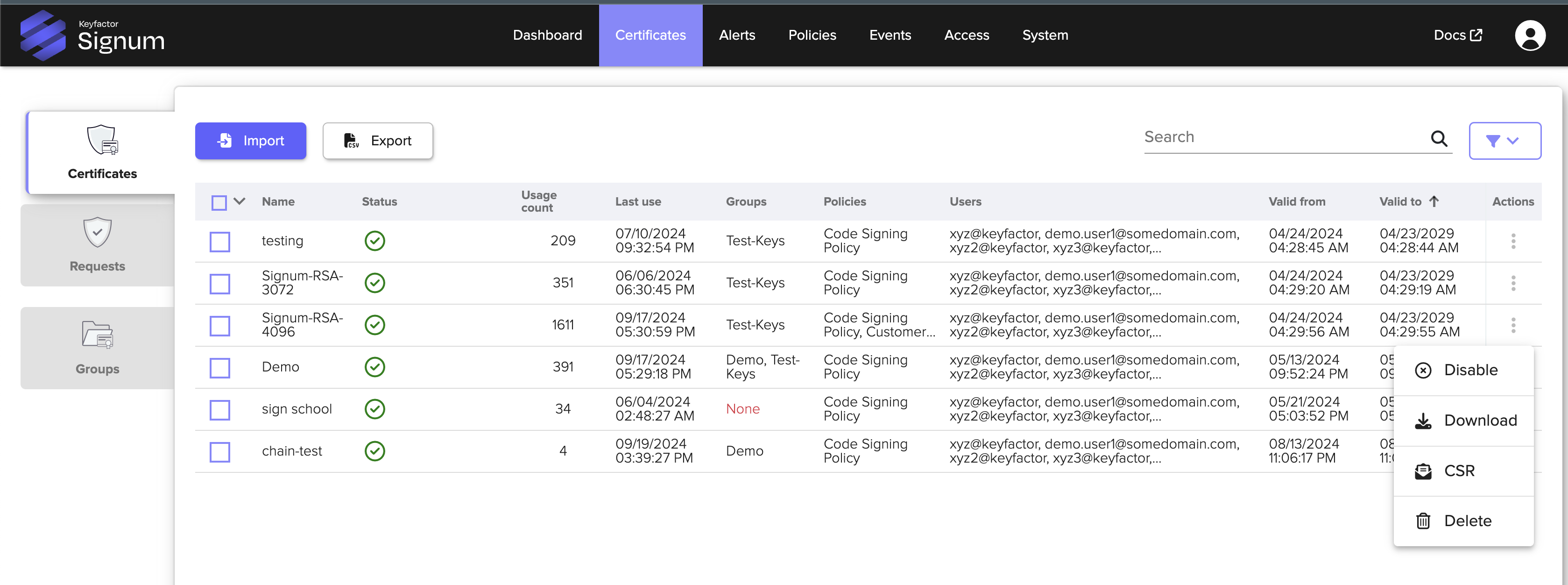
Log in to the Signum Admin Web Console and download the certificate you want to sign with by clicking the actions part of the certificate table.
Thesignum-util tool can be used to list certificates.
signum-util lcSubject CN : Signum-RSA-3072
Issuer CN : DemoRoot-G2
Valid Until : 2029-04-23
Valid From : 2024-04-24
Thumbprint : 170570A1D56FBB5A4CC780B69ACAEF94010D5DAA
Subject CN : Signum-RSA-4096
Issuer CN : DemoRoot-G2
Valid Until : 2029-04-23
Valid From : 2024-04-24
Thumbprint : 3AB5BFB91DFBB46CF765D5BEE51429618C4857DD
Subject CN : Signum-RSA-2048
Issuer CN : DemoRoot-G2
Valid Until : 2030-02-05
Valid From : 2025-02-06
Thumbprint : F78AE7871FEF1D0CF3EFFB58E9CC85F261438D2BSigning
echo "Some Data to Sign" >> somefile.txtInclude the thumbprint of the certificate you want to sign with:
From OpenSSL 3.0.8, PKCS#11 certification is required. For an example, see Sign the File below.
openssl cms -sign -in somefile.txt -out signed_message.p7s -signer Signum-4096-Cert.pem -inkey 3AB5BFB91DFBB46CF765D5BEE51429618C4857DD -engine pkcs11 -keyform engineEngine "pkcs11" set.Verifying
openssl cms -verify -in signed_message.p7s -content somefile.txt -certfile Signum-4096-Cert.pem -purpose any -CAfile BenDemoRootG2-chain.pemSome Data to Sign
CMS Verification successfulSigning Using OpenSSL with SignServer
The following steps show how to sign a file using OpenSSL and SignServer.
For setup instructions, see Signum Agent in the SignServer documentation.
Configure OpenSSL
Install the OpenSSL PKCS11 module.
CODEsudo apt-get install libengine-pkcs11-opensslEdit your OpenSSL config file by default in: /usr/lib/ssl/openssl.cnf and add the following entries:
CODE[openssl_init] engines=engine_section [engine_section] pkcs11 = pkcs11_section [pkcs11_section] engine_id = pkcs11 MODULE_PATH = /usr/lib/libkeyfactorpkcs11.so init = 0
The section [openssl_init] should already be in your openssl.cnf. Add the engines=engine_section there.
This configuration adds Signum as a PKCS11 interface to OpenSSL, allowing for crypto operations with key storing provided by Signum.
Using OpenSSL
The pkcs11-tool can be used to view available key objects to the authenticated Signum user:
pkcs11-tool --module /usr/lib/libkeyfactorpkcs11.so -O
Using slot 0 with a present token (0x11)
Certificate Object; type = X.509 cert
  label:      0A9861B55542C065E68DBA15AA106C6C02095A2B - Certificate
  subject:    DN: CN=code00001, OU=Testing, O=SignServer, C=SE
  ID:         0a9861b55542c065e68dba15aa106c6c02095a2b
  Unique ID:
Public Key Object; RSA 2048 bits
  label:      0A9861B55542C065E68DBA15AA106C6C02095A2B - Public key
  ID:         0a9861b55542c065e68dba15aa106c6c02095a2b
  Usage:      encrypt, verify, wrap
  Access:     none
  Unique ID:
Private Ke
y Object; RSA
  label:      0A9861B55542C065E68DBA15AA106C6C02095A2B - Private key
  ID:         0a9861b55542c065e68dba15aa106c6c02095a2b
  Usage:      decrypt, sign, signRecover, unwrap
  Access:     sensitive, extractable
Unique ID: p11tool --list-tokens --provider /usr/lib/libkeyfactorpkcs11.so
Token 0:
URL: pkcs11:model=Linux%00%20%20%20%20%20%20%20%20%20%00;manufacturer=Keyfactor%00%20%20%20%20%20%20%20%20%20%20%20%20%20%20%20%20%20%20%20%20%20%00;serial=1%00%20%20%20%20%20%20%20%20%20%20%20%20%20%00;token=Keyfactor%20for%20Linux%00%20%20%20%20%20%20%20%20%20%20%20%00
Label: Keyfactor for Linux
Type: Hardware token
Flags: uPIN uninitialized
Manufacturer: Keyfactor
Model: Linux
Serial: 1
Module: Sign the File
To create a test .txt file to sign, run the following command:
echo test > test.txtTo sign the .txt file, run the following command:
openssl dgst -engine pkcs11 -keyform engine -sha256 -sign "pkcs11:model=Linux;manufacturer=Keyfactor;serial=1;token=Keyfactor for Linux" test.txt > signature.bin
Engine "pkcs11" set.
Verify
To verify the signature, run the following command:
openssl dgst -engine pkcs11 -keyform engine -sha256 -verify "pkcs11:model=Linux;manufacturer=Keyfactor;serial=1;token=Keyfactor for Linux" -signature signature.bin < test.txt
Engine "pkcs11" set.
Verified OK