
About Keyfactor Test Drives
The Keyfactor Test Drive platform contains Keyfactor Command, EJBCA, and SignServer. On top of the platform, several Test Drives are available with ready-to-use how-to guides for Certificate Lifecycle Management (CLM), public-key infrastructure (PKI), and signing use cases.
You can select the Test Drive that best fits your needs and quickly test and validate what matters most for your use case.
Below, you can learn more about the applications and pre-configuration.

The Keyfactor Test Drives are test and demonstration environments only and not intended for production use. Each Test Drive is self-contained on a single host and will automatically terminate after 30 days. Do not store any data on this host that you need to preserve.
Keyfactor Test Drive Architecture
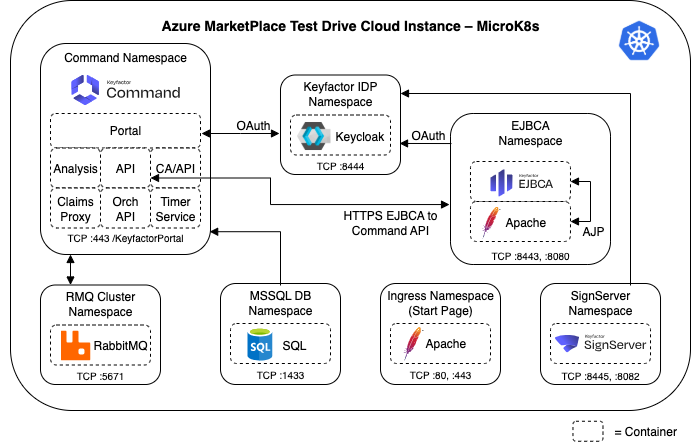
Keyfactor Test Drive Applications
Keyfactor Command
Keyfactor Command is the certificate lifecycle management (CLM) tool. Command provides a view of all certificates issued and will track their expiration dates. Command also allows users to find every certificate in every location using real-time CA synchronization, network scanning, and agent-based or agentless discovery of key and trust stores.
Keyfactor Command comes pre-configured with the EJBCA Certificate Authorities that are generated uniquely for your Test Drive as part of the provisioning process. Any certificates you issue in EJBCA will automatically be synchronized to Command for inventory.
Keyfactor Universal Orchestrator
The Keyfactor Universal Orchestrator allows users to deploy modular orchestrators to automatically provision or discover certificates directly to network endpoints, load balancers, servers, and cloud workloads.
The Universal Orchestrator is installed by using the available installation scripts for Windows or Linux.
EJBCA
EJBCA is the PKI solution in the Test Drive, providing the pre-configured Certificate Authorities (CAs) that issue certificates.
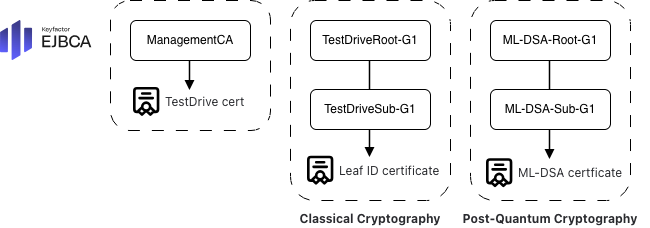
When deployed, the Test Drive automatically provisions the following CAs:
ManagementCA: Issues certificates used by the Test Drive environment itself, such as the TLS certificate for the web server.
For Classical Cryptography:
TestDriveRoot-G1 and TestDriveSub-G1 – The classical root and issuing CAs.
For Post-Quantum Cryptography (PQC Lab Test Drive):
ML-DSA-Root-G1 and ML-DSA-Sub-G1 – Post-quantum root and issuing CAs based on ML-DSA.
Root with ML-DSA 87, Sub CA with ML-DSA 65, and end-entity certificates with ML-DSA 44.
SignServer
SignServer is the signing solution in the Test Drive, integrated with EJBCA for certificate issuance, and pre-configured with signing workers that are used to sign and timestamp artifacts.
When deployed, the Test Drive automatically provisions the following signing workers.
PKCS12: Crypto token worker to manage the certificate and keys in the PKCS12 file.
Plain Signer: Provides a detached signature of the artifact using an ML-DSA 44 certificate.
MS Authenticode Signer: Sign and timestamp MSI and exe files for the Windows operating system using an ML-DSA 44 certificate.
Jar Signer: Sign and timestamp Java JAR files using:
RSA2048 certificate for classical cryptography
ML-DSA 44 certificate for post-quantum cryptography
CMS Signer: Sign and timestamp files with a detached signature using:
RSA2048 certificate for classical cryptography
ML-DSA 44 certificate for post-quantum cryptography
Timestamp Signer: Timestamps an artifact using:
RSA4096 certificate for classical cryptography
ML-DSA 65 certificate for post-quantum cryptography
All certificates are issued by EJBCA using the RSA Issuing CA for classical cryptography and the ML-DSA PQC Issuing CA for PQC.
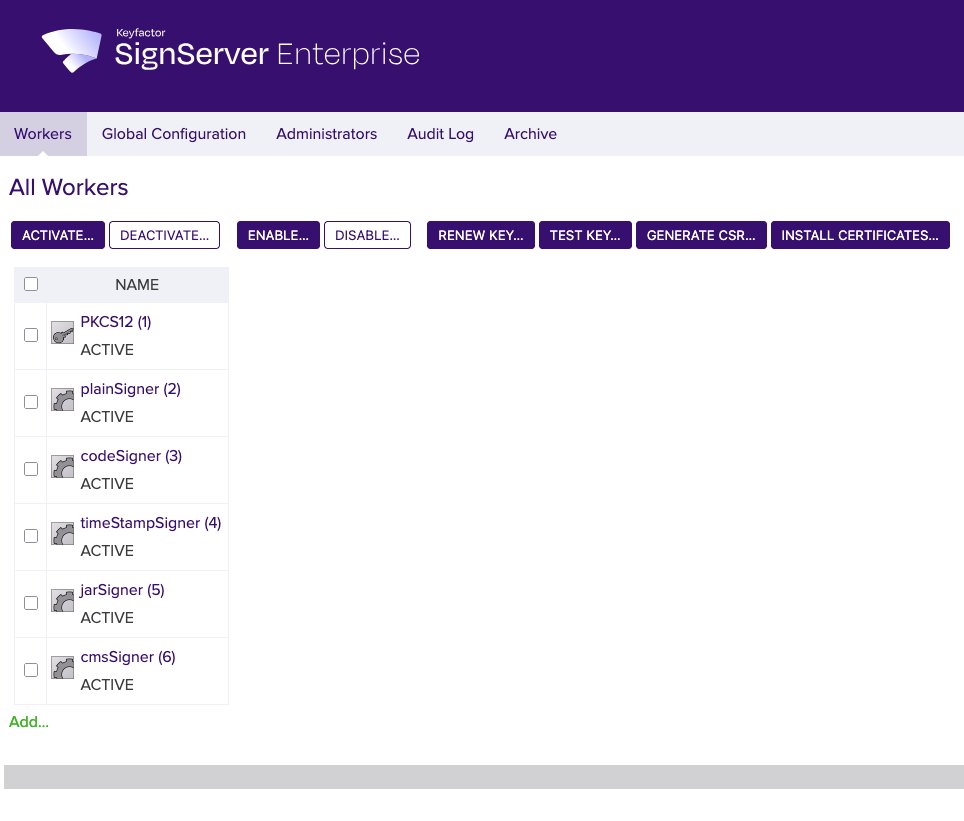
The SignServer GUI with the pre-configured signing workers.
The SignClient and REST API can be used to sign artifacts, and OpenSSL 3.5 or later can be used to validate the PQC signatures.
Currently, the jarsigner tool in Java 25 does not support ML-DSA signatures. As a result, signature validation will fail.
Additional Applications
The Keyfactor Test Drives include the following supporting applications:
Keycloak – Provides single sign-on (SSO) for web apps and RESTful services, ensuring all applications in the Test Drive share a common, secure login source.
The following applications run in the background but typically do not require direct interaction:
SQL Express - Database used by Keyfactor Command, EJBCA, and Keycloak.
Kubernetes - Orchestrates and runs EJBCA, Apache, and Keycloak in containers.
Apache - Functions as a front-end proxy, forwarding AJP traffic to EJBCA.
Other Applications - The system includes additional services (see diagram below).
Next Steps
Sign up and start using Keyfactor Test Drives, see Sign Up for Keyfactor Test Drives.
Learn more and select which test drive suits your needs, see:
Contact us
Schedule a live demo with one of our experts to discuss your environment, integration options, and how we can help you move from test drive to production.