
Upgrading EJBCA
This page provides general information about upgrading EJBCA and applies to all deployment types.
For environment-specific instructions, refer to the corresponding upgrade procedure for your deployment type.
 | |
 | |
 | |
 | |
 | |
 |
Also see the EJBCA Upgrade Notes for the version you plan to upgrade to (and any version in between).
Concepts
For production environments, Keyfactor recommends evaluating the upgrade using a staging environment with production-like data.
Upgrade Steps
Except for cases involving underlying technology changes (such as upgrading the JDK or application server due to a technology leap), upgrading EJBCA primarily involves deploying the new EAR file to your application server. Data modifications occur in three discrete steps:
Label | Description |
|---|---|
Lazy Upgrade | When data needs to be added to an object as a result of new functionality, but that data only needs to be present when that data is utilized, it will be added as part of a lazy upgrade, meaning that the data will be added the next time that object is referenced as part of normal operations. This is the preferred method of upgrading database objects in EJBCA. |
Upgrade | For data which needs to be processed and rolled out holistically, this action will be performed upon deploying the new EAR to the application server. EJBCA tracks the current version of the database, and if it detects that the data in the database is older than the deployed version the upgrade procedure will be run automatically. Between this step and the next one the data in EJBCA’s database is still compatible with both the current and previous version, for reasons that will be explained under the Zero Downtime section. |
Post Upgrade | After performing the Upgrade step, EJBCA may (but not for all releases) prompt administrators to perform a post-upgrade. This step is manual (again for reasons explained under the Zero Downtime section). After performing post-upgrade, the data in the database will no longer be compatible with the previous version of EJBCA. Until post-upgrade has taken place, the upgrade may still be rolled back. Running between Upgrade and Post Upgrade will not cause loss of critical data, but some manually performed changes after Upgrade may be lost (though certificates and audit logs are unaffected). |

Keyfactor does not recommend downgrading EJBCA except in emergency situations.
Database and Semantic Versioning
EJBCA follows strict semantic versioning, which can provide guidance on what happens during an upgrade:
Label | Increment | Description |
|---|---|---|
Major | X.y.z | May involve technological leaps or significant changes to EJBCA functionality. Can include database changes such as adding tables, columns, or modifying data. |
Minor | x.Y.z | Like Majors, Minors may also perform database changes such as adding tables, columns, or modifying data. |
Maintenance | x.y.Z | Does not modify the database structure and is limited to adding data. Designed for quick deployment. |
EJBCA normally performs all required database modifications automatically upon restarting the application server, assuming the database account used by WildFly has sufficient rights. If not, manual SQL scripts for database upgrades are available under the src/upgrade folder in the source code.
EJBCA supports upgrading directly to the most recent version from the current version, unless prevented by unsupported versions or a required technology jump. Intermediate releases do not need to be deployed; EJBCA automatically determines the necessary upgrade steps.
Zero Downtime Upgrades
Critical Operations
For installations of EJBCA deployed on a cluster of two or more nodes, the following operations are guaranteed to function without downtime:
Enrollment: Creating End Entities
Issuance: The acceptance of CSRs, issuance and transmission of issued certificate to the subscriber
Revocation: Revoking issued certificates
Validation: Continued issuance of CRLs and signing OCSP responses
Audit Logging
Other operations, such as modifying profiles or editing CAs, may experience temporary interruptions until all nodes are upgraded. These operations are discouraged until the final node has been upgraded.
Data in Transit
Data created using the previous version while an upgrade is in progress will remain viable after the upgrade.
Examples include:
Publishing operations stored in the publishing queue
Unresolved Approval operations.
ACME orders waiting for challenge resolution
Upgrade Strategy Across a Cluster/Multiple Clusters
Overview
For a high-volume, highly available deployment:
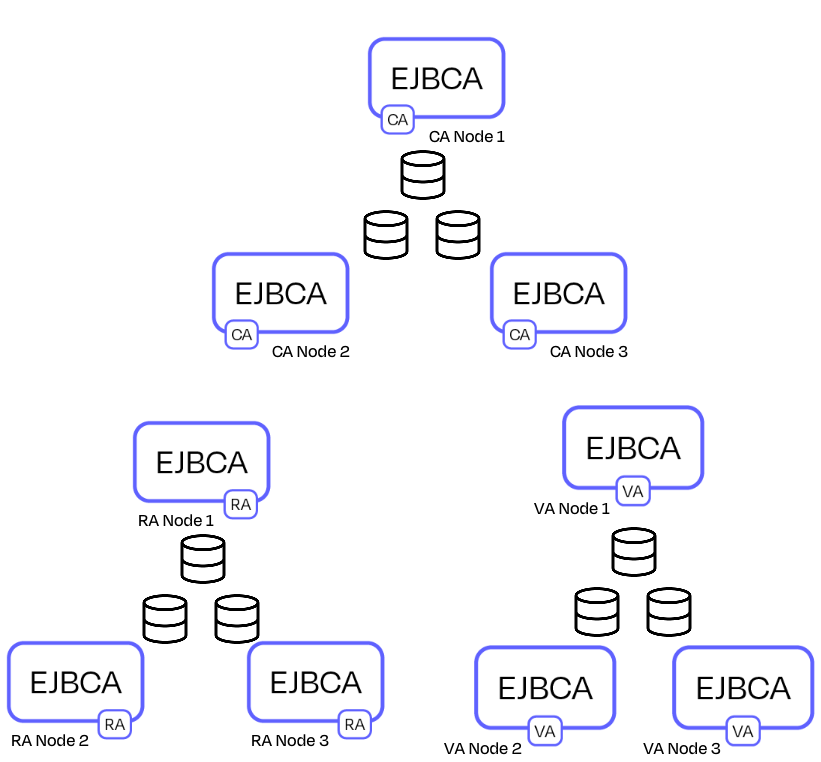
A CA cluster is served by an RA cluster and a VA cluster, connected via Peering.
Each node in each cluster has its own database, but as each database is synchronized they can from a practical point of view be considered a single logical database.
High-Level Strategy
The strategy for upgrading such a deployment is:
Step 1: Upgrade the RA cluster and VA cluster first, in either order, see Cluster Strategy.
Step 2: Upgrade the CA cluster.
Upgrading external nodes first ensures the CA node uses a Peering protocol compatible with the other nodes. Upgrading the CA first could create incompatibility, since it would use a newer version of the Peering protocol, that could be incompatible with the RA/VA EJBCA nodes.
Cluster Strategy
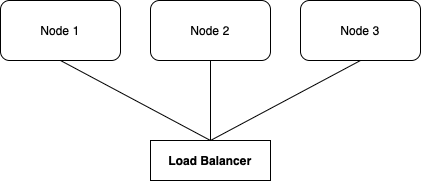
A clustered deployment should be behind a load balancer to ensure even workload distribution.
Follow these steps:
Step 1: Remove Node 1 from the Load Balancer (LB) to ensure that no traffic reaches it during WildFly redeployment.
Step 2: Upgrade Node 1.
The common database is now modified with whatever changes required for Node 1 to be able to resume critical operations (see above). Critical operations on un-upgraded nodes continue unaffected.
Step 3: Return Node 1 to the Load Balancer rotation.
Step 4: Repeat steps 1-3 for remaining nodes.
Step 5: Perform post-upgrade on any node if required.
After post-upgrade, the database is in a post-upgrade state and may be incompatible with the previous version.
The significance of running post-upgrade manually is that EJBCA has no way of knowing the number of nodes in the cluster, nor how many of those nodes (beyond the first) which have been upgraded yet.
Following the upgrade procedure outlined above allows a complete upgrade to be performed with zero detectable downtime by subscribers.